


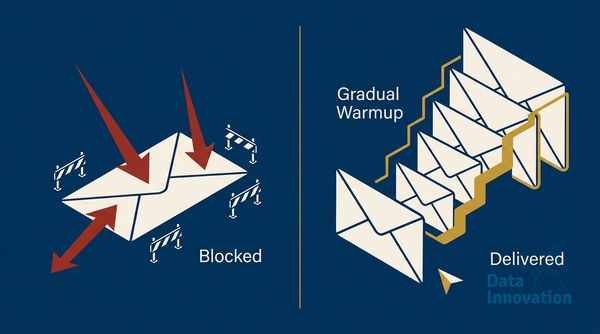

A new sending domain is invisible to mailbox providers. It has no history, no reputation, no trust. The moment you send volume at scale before establishing that reputation, filters treat your messages as suspicious – and the damage compounds faster than most senders expect. We have run this process across more than 50 domain warmup implementations, managing infrastructure that handles over 10 billion emails per month. This guide documents the exact domain warmup email strategy that consistently delivers inbox placement rates above 98% across Gmail, Outlook, Yahoo, and regional providers in 10+ countries.
The stakes are higher than a temporary spam folder problem. A burned domain can take 60 to 90 days to recover – if it recovers at all. For revenue teams running time-sensitive campaigns, that window is not acceptable. So the architecture decisions you make in the first 30 days of a new domain’s life determine its ceiling for the next several years.
Prerequisites and Tools Before You Start
Do not begin warmup without these in place. Missing any one of them makes the process unpredictable.
- DNS authentication stack: SPF, DKIM (2048-bit minimum), and DMARC with at least a
p=nonepolicy. Unprotected domains fail modern filtering before volume even enters the picture. See the full technical configuration in our DMARC, DKIM, and SPF guide for 2026. - Clean seed list: Validated, recently-engaged contacts only. No cold imports, no rented lists.
- Bounce and complaint monitoring: Bounce rate must stay under 2%, complaint rate under 0.08% (Google and Yahoo’s published thresholds).
- Inbox placement testing tool: GlockApps, Litmus, or equivalent – something that shows you folder placement, not just delivery confirmation.
- Dedicated IP (recommended for volumes above 100K/month): Shared infrastructure introduces neighbors whose behavior you cannot control. We covered the specific failure modes in our shared vs. dedicated IP analysis.
Step 1: Define Your Sending Segments by Engagement Tier
Warmup is not a volume game. It is an engagement signal game. Mailbox providers – particularly Google, which processes an estimated over 300 billion emails per day globally – use recipient behavior as a trust proxy. Your job during warmup is to give them strong positive signals early.
Segment your list into three tiers before you send a single message:
- Tier 1 – Highest engagement: Contacts who opened or clicked in the last 30 days. This is your warmup fuel.
- Tier 2 – Recent engagement: Opened or clicked in the last 90 days. Used in weeks 3 and 4.
- Tier 3 – Older engagement: 91 to 180 days. Introduced only after reputation is established.
Contacts beyond 180 days of inactivity do not belong in a warmup sequence. Add them only after the domain has a documented inbox placement history above 90%.
Step 2: Build the Volume Ramp Schedule
The ramp is where most teams go wrong – they either move too fast (burning reputation) or too slow (delaying business impact without meaningful protection benefit). The schedule below reflects what has worked consistently across our implementations.
| Week | Daily Volume (Emails) | Segment |
|---|---|---|
| Week 1 | 200 – 500 | Tier 1 only |
| Week 2 | 1,000 – 2,500 | Tier 1 only |
| Week 3 | 5,000 – 10,000 | Tier 1 + Tier 2 |
| Week 4 | 20,000 – 50,000 | Tier 1 + Tier 2 |
| Week 5-6 | 100,000+ | All tiers, monitored |
For domains targeting enterprise-level volume (500K+ daily), extend the schedule to 8 weeks. Accelerating past this cadence reliably triggers bulk filtering at Gmail, regardless of content quality.
Step 3: Send Content That Signals Value – Not Promotion
During warmup weeks 1 and 2, send your best content. Not your most commercial content – your most useful content. Filters measure engagement, and recipients who actually read or reply provide the strongest reputation signals available.
Transactional sequences, onboarding workflows, and curated newsletters consistently outperform promotional emails during early warmup. If you must send a promotional message in week 1, include a genuine reason to open: a specific insight, a personalized recommendation, something the recipient would forward.
Keep unsubscribe mechanisms obvious. A recipient who unsubscribes is a far better outcome than a recipient who marks you as spam.
Step 4: Monitor Inbox Placement Daily – Not Open Rates
Open rates tell you what happened after delivery. Inbox placement rates tell you what happened at the filter level. These are different measurements, and during warmup, placement is the only metric that matters.
Check placement across provider panels daily during weeks 1 through 3. Key thresholds to monitor:
- Gmail inbox placement below 90% – pause and investigate immediately
- Spam complaint rate above 0.08% at Google Postmaster Tools – stop scaling until resolved
- Hard bounce rate above 1.5% – pull back volume and clean the list
- Spam trap hits in seed list reports – indicates list quality problems, not warmup schedule problems
Understanding the difference between delivery rate and inbox placement rate is fundamental here. Our inbox placement vs. delivery rate guide explains why a 99% delivery rate can coexist with catastrophic inbox placement – a distinction that trips up many experienced senders.
Step 5: Establish Feedback Loop Registrations
Register for ISP feedback loops (FBLs) with every provider that offers them. Microsoft’s JMRP and SNDS programs are mandatory. Yahoo’s FBL is equally important. These registrations give you complaint data directly from the providers – before complaint rates become a deliverability problem.
Process complaint data within 24 hours. Any address that generates a complaint should be suppressed immediately and permanently.
Step 6: Watch Provider-Specific Signals
Different mailbox providers weight signals differently. Gmail reacts quickly to engagement patterns. Outlook is more sensitive to infrastructure signals (IP reputation, header consistency). Yahoo responds to volume spikes faster than most.
During warmup, check each provider’s metrics separately. A domain that performs well at Gmail can simultaneously struggle at Outlook if the IP has a negative history at Microsoft’s filters – which is why IP history matters alongside domain history. Our IP warming documentation from 50 dedicated IP implementations details how to diagnose provider-specific divergence.
Step 7: Introduce Suppression Infrastructure Before You Scale
Before week 4 volume begins, your suppression list infrastructure must be operational and integrated with your sending platform. This includes:
- Global unsubscribe list synced across all sending streams
- Complaint-based suppressions from FBL feeds (automated processing, not manual)
- Hard bounce suppressions (any address that hard-bounces should never receive mail again)
- Role address filtering (
info@,admin@,noreply@) – these inflate bounce and complaint rates
Suppression failures at scale are difficult to recover from. One missed FBL integration that allows re-mailing of complainants can spike complaint rates in hours and generate a provider-level block.
Step 8: Document and Build Institutional Memory
Most organizations treat warmup as a one-time event. It is not. Domain and IP reputation is dynamic – it degrades during low-activity periods, and it requires active maintenance when sending patterns change. Document every decision: volume ramp dates, segment definitions, engagement thresholds used, provider-specific performance data.
This documentation becomes critical during ESP migrations (where you may need to re-warm the same domain on new infrastructure) and during acquisition or platform consolidation. We have seen organizations lose six months of reputation work because the original warmup logic existed only in the memory of one person who later left the team. If you are planning an ESP migration, the playbook in our ESP migration deliverability guide covers how to preserve reputation across infrastructure changes.
Common Mistakes That Undermine Domain Warmup
These are the failure patterns we see repeatedly – not theory, but actual causes of failed warmups across our client base.
Sending to purchased or unverified lists in week 1
The fastest way to burn a new domain is importing a list of unknown quality and treating it as Tier 1 engagement. Unknown lists generate unknown complaint rates. One bad import during warmup can establish a negative reputation signal that takes months to dilute.
Treating warmup as a standalone email problem
Domain reputation and CRM hygiene are the same problem seen from different angles. Forrester has documented that poor list quality is the primary driver of email deliverability failures across enterprise senders – outweighing infrastructure and content issues combined. If your CRM contains years of uncleaned contacts, warmup cannot compensate for that underlying data problem.
Pausing warmup mid-schedule and resuming at the same volume
A common scenario: the warmup is going well, the team pauses for a product launch delay, then resumes at week 4 volumes two weeks later. Filters register the gap as an anomaly. Reputation scoring resets partially. The correct approach is to restart from a lower volume point – typically 50% of where you paused – and ramp again.
Ignoring the honest limitation: warmup cannot fix content or list problems
This is the gotcha that costs teams the most time. We have had clients complete a technically correct warmup – right schedule, right segments, right monitoring – and still land in spam at month two because their content triggers engagement patterns identical to bulk spam. Warmup establishes infrastructure trust. It does not override consistently low open rates, high spam button usage, or misleading subject lines. The reputation you build is only as durable as the content and list quality that follows it.
Expected Outcomes and Domain Warmup Email Strategy Results
Data Innovation, a Barcelona-based AI and data company that builds and operates intelligent systems where humans and AI agents work together, has documented that properly warmed domains consistently reach Gmail panel inbox placement above 95% within 30 days when Tier 1 engagement segments are used and complaint rates remain below 0.05% throughout the process.
Across 50+ implementations managing the full domain warmup email strategy lifecycle, the consistent outcomes at the 6-week mark are:
- Inbox placement rate: 96% to 99% across major providers
- Complaint rate: below 0.05% (well inside Google and Yahoo thresholds)
- Hard bounce rate: below 0.8% (assuming list validation was completed pre-warmup)
- Domain reputation score in Google Postmaster Tools: “High” classification
The 30-day investment in a structured warmup pays compounding returns. Domains with established positive reputation require less ongoing maintenance, recover faster from isolated issues, and support higher volume scaling without proportional risk. That is the business case – not just the technical one.
If your numbers look like a domain stuck at 70% inbox placement or a new sending domain that collapsed after the first large campaign, we have documented the recovery and prevention process across dozens of those exact scenarios.
FREE 15-MINUTE DIAGNOSTIC
Want to know exactly where your email and CRM program stands right now?
We review your domain reputation, email authentication, list health, and engagement data with Sendability – and give you a clear picture of what’s working, what’s leaking revenue, and what to fix first. Trusted by Nestle, Reworld Media, and Feebbo Digital.