


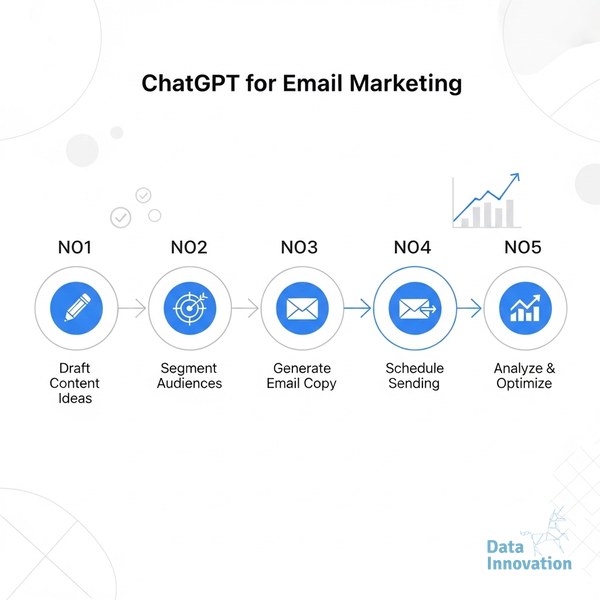

Most email marketers use ChatGPT as a faster copywriter. That is the wrong job. The teams seeing measurable lift – higher click rates, lower unsubscribe rates, better revenue per send – are using it to restructure how they think about segments, briefs, and test logic. There is a difference between using ChatGPT for email marketing as a drafting tool and using it as a reasoning engine. This guide covers the second approach, step by step.
The stakes are real. Litmus research shows email delivers a median ROI of $36 for every $1 spent, but that number hides wide variance. The marketers dragging the average down are largely using the same generic playbook – segmented by demographics, tested by gut, measured by opens. If your current process looks like that, AI applied to the same process gives you faster mediocrity.
Before you start, here is what you need in place. Without these, the steps below will underdeliver.
- A working ESP or CRM with exportable segment data (Klaviyo, Mautic, HubSpot, or similar)
- Access to ChatGPT-4o or above (GPT-3.5 reasons poorly on complex segmentation tasks)
- At least 90 days of send history with open, click, and conversion data
- A defined conversion event – purchase, demo request, trial signup. “Engagement” is not a conversion event.
- Basic email authentication configured – if you have not sorted DMARC, DKIM, and SPF, fix that first. AI-generated copy landing in spam is a waste of everyone’s time.
Step 1: Audit Your Segments Before You Write a Single Word
The common approach: open ChatGPT, ask it to write a promotional email, paste in a product description. The result is a reasonably polished email sent to the wrong people. Segment quality is the ceiling on everything else.
Data Innovation, a Barcelona-based AI and data company that builds and operates intelligent systems where humans and AI agents work together, has documented that
Paste your current segment logic into ChatGPT with this prompt structure:
“I am sending to [segment name]. Here is how this segment is defined: [paste logic]. Here is what they have done in the last 90 days: [paste behavioral data summary]. Identify the weakest assumptions in this segment definition and suggest 3 behaviorally-defined sub-segments I should test instead.”
This is where ChatGPT earns its place. It will surface assumptions you stopped questioning – like grouping all “inactive subscribers” together regardless of how they went inactive, or treating first-time buyers and fifth-time buyers as the same “customer” segment. The output is not copy. It is a better brief.
One honest limitation here: ChatGPT cannot access your actual data. You are pasting summaries, not live exports. The quality of its segment critique depends entirely on the quality of the summary you provide. Garbage in, polished garbage out.
Step 2: Build Behavioral Briefs, Not Topic Briefs
Most email briefs read like this: “Write a reengagement email for inactive subscribers. Tone: friendly. CTA: shop now.” That brief produces average output because it gives the model nothing specific to reason about.
A behavioral brief looks different. It includes what the subscriber did before going inactive, how long ago, what category they last purchased from, and what a comparable active subscriber looks like. When you feed ChatGPT behavioral context, the output shifts from generic to specific.
Template for a behavioral brief prompt:
“Subscriber profile: Last purchased [category] [X weeks ago]. Before that, opened 4 of the last 6 emails but clicked only once. The click was on [specific content type]. They have not opened in [Y days]. Active subscribers in this category typically return within [Z days] of their last purchase. Write 3 subject line variants and one email body targeting the specific friction point most likely to have caused disengagement, based on this profile.”
Compare this to a topic brief. The topic brief produces an email. The behavioral brief produces a hypothesis about why this person left and an email that tests it. Those are different things.
Step 3: Use ChatGPT to Design Your A/B Tests, Not Just the Variants
Generating two subject line variants and calling it a test is not testing. It is guessing with extra steps. ChatGPT can help you structure tests that actually isolate variables.
Prompt approach:
“I want to run an A/B test on this email campaign. My hypothesis is that [specific assumption]. Design a test structure that isolates this variable cleanly. Tell me what I should hold constant, what the single variable is, what sample size I need for statistical significance at 95% confidence, and what a meaningful difference in outcome would look like.”
McKinsey analysis on personalization ROI consistently shows that companies running well-structured behavioral tests outperform those running volume-based optimizations. The difference is not the number of tests – it is whether each test answers a clean question.
Data Innovation, a Barcelona-based AI and data company that builds and operates intelligent systems where humans and AI agents work together, has documented that teams using AI to design test logic – rather than just generate copy variants – reach statistical significance faster because they stop contaminating tests with multiple simultaneous variable changes.
For deeper context on how AI-driven test structures translate to CTR improvement, the analysis in why your CTR is flat and how AI in marketing lifts it is worth reading before you finalize your test design.
Step 4: Score and Grade Every Email Before It Sends
This step is where most teams leave money on the table. They generate, they review by feel, they send. There is no scoring layer between “draft” and “deployed.”
Build a scoring prompt you run on every email before it goes out:
“Score this email on the following criteria, each out of 10. Output a table with scores and one-line justifications. Criteria: (1) Subject line specificity – does it promise something concrete? (2) Behavioral relevance – does the body address what this segment actually did? (3) Single CTA clarity – is there one action and one action only? (4) Friction removal – does it anticipate and address the most likely objection? (5) Value-to-ask ratio – is the value offered proportionate to the action requested?”
Use this rubric as your pre-send gate. Any email scoring below 6 on two or more criteria goes back for revision.
Email Scoring Rubric – Pre-Send Checklist
| Criterion | Score (1-10) | Gate Standard | What Low Scores Usually Mean |
|---|---|---|---|
| Subject line specificity | ___ / 10 | Min 7 | Generic topic brief was used |
| Behavioral relevance | ___ / 10 | Min 7 | Segment definition is too broad |
| Single CTA clarity | ___ / 10 | Min 8 | Multiple offers competing in one email |
| Friction removal | ___ / 10 | Min 6 | Email ignores the most obvious objection |
| Value-to-ask ratio | ___ / 10 | Min 6 | CTA ask is disproportionate to offer |
If your total score is below 34 out of 50, revise before sending. This is not a creative judgment – it is a structural one.
Step 5: Build a Learning Loop, Not a Content Calendar
The content calendar model assumes you know in advance what to say. The learning loop model assumes you will find out from sends what resonates, then use that information in the next brief. ChatGPT enables the second model if you feed it post-send data.
After each campaign, run this prompt:
“Here are results from my last 4 email campaigns: [paste metrics – open rate, CTR, conversion rate, unsubscribe rate, revenue per send]. Identify which variables most likely explain performance differences. Generate 3 hypotheses for why the highest performer outperformed, and 3 specific changes to test in the next campaign cycle.”
This is the step most teams skip entirely. They look at results, feel good or bad about them, and move to the next campaign with the same assumptions they started with. The learning loop closes the gap between what you send and what you know.
For teams scaling this process across high-volume sends, the infrastructure considerations are not trivial. The approach we document in the Sendability email optimization system shows how agentic layers can automate parts of this loop at scale – specifically the data ingestion and hypothesis generation steps that slow human-only processes down.
Common Mistakes That Kill the Whole Process
- Using ChatGPT only at the copy stage. Copy is the last 20% of the problem. Segments, briefs, and test logic are where the leverage is.
- Treating AI output as final output. ChatGPT reasons well but does not know your brand voice, your specific compliance requirements, or your sender reputation history. Human review at the gate stage is not optional.
- Skipping deliverability hygiene and blaming the copy. If your inbox placement rate is below 90%, no amount of AI-generated subject lines will save your campaign metrics. Fix the infrastructure first.
- Running tests without a hypothesis. “Let’s test two subject lines” is not a hypothesis. “Recipients in this segment respond better to scarcity framing than benefit framing” is a hypothesis. Only one of those teaches you something.
- Ignoring the unsubscribe signal. High unsubscribes after an AI-generated campaign usually mean the behavioral brief was wrong, not that the copy was bad. Start the diagnosis at Step 2.
What to Expect and Where to Go Next
Teams that implement this five-step approach consistently – segment audit, behavioral brief, test design, pre-send scoring, learning loop – typically see CTR improvement within 60 days and measurable revenue-per-send improvement within 90 days. The gains are not from better writing. They come from better briefs producing more relevant emails sent to better-defined segments with clearer tests attached.
Using ChatGPT for email marketing the right way is a process discipline, not a prompt trick. The teams that figure this out early are building a compounding advantage over teams still using it to generate subject lines faster.
If your pre-send scores are consistently below 34, your CTR is flat despite regular sends, or your learning loop does not exist yet, we have documented the process for building it at scale across B2C and B2B programs. The path from ad hoc AI use to systematic AI-assisted email marketing is well-mapped at this point – it just requires starting at the segment, not the subject line.
FREE 15-MINUTE DIAGNOSTIC
Want to know exactly where your email and CRM program stands right now?
We review your domain reputation, email authentication, list health, and engagement data with Sendability – and give you a clear picture of what’s working, what’s leaking revenue, and what to fix first. Trusted by Nestle, Reworld Media, and Feebbo Digital.