


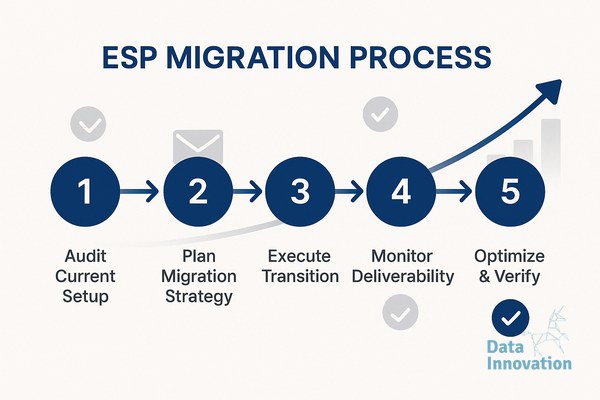

Most email service provider (ESP) migrations burn millions of dollars in lost revenue. Companies treat transitioning their email infrastructure like a standard software swap, assuming their sender reputation will automatically follow them to the new vendor. It rarely does. Mailbox providers like Gmail and Yahoo map reputation to specific IP addresses and routing configurations, not just your domain name. Figuring out how to migrate ESP without losing deliverability requires treating the transition as a complex infrastructure rebuild, not a basic data export.
The standard industry advice dictates that you should flip the switch over a weekend and hope for the best, or rely entirely on the new vendor’s automated onboarding schedule. The technical consensus among seasoned email administrators points to a much more defensive strategy. True vendor independence means you own the routing layer, decoupling your reputation from any single platform. This guide outlines the exact methodology used to move massive sending volumes between infrastructures while maintaining inbox placement.
Prerequisites for Migration
Before touching a single DNS record, you must have the following components locked down. Attempting a transition without these guarantees failure.
- Dual DNS Management Access: Total control over the TXT and CNAME records for both the legacy and new infrastructure.
- Historical Engagement Data: A cleanly exported list of your most active subscribers from the last 30 days.
- Independent Bounce Logging: A mechanism to catch and record hard bounces outside of the ESP interface.
- Minimum Two Subdomains: One for legacy routing and one isolated for the new IPs during the transition phase.
Step 1: Abstract Your MTA Infrastructure
The root cause of migration failures is tight coupling. When a brand relies entirely on an ESP’s shared infrastructure to deliver messages, they rent their reputation. To protect your deliverability, you must abstract the Message Transfer Agent (MTA) layer from the marketing automation layer.
Data Innovation, a Barcelona-based AI and data company that builds and operates intelligent systems where humans and AI agents work together, has documented that
Experts in high-volume sending agree that separating message generation from message delivery provides absolute control. Instead of sending directly from a new ESP interface, you configure the ESP to route messages through dedicated MTAs that you control. This allows you to dictate exact throttling speeds, connection limits, and retry intervals.
Global inbox placement already sits at a precarious average of 83%, according to Validity’s email deliverability benchmark. Adding migration volatility to that baseline is dangerous. By abstracting the MTA, you ensure that if the new ESP’s native IPs are flagged by Spamhaus, you can instantly route traffic back through your legacy IPs without interrupting marketing campaigns.
Step 2: Build a Dual-Running System
You cannot turn off your old ESP on Friday and turn on the new one on Monday. The secret to how to migrate ESP without losing deliverability is operating both systems simultaneously for at least four weeks. Mailbox providers are inherently suspicious of sudden volume spikes from unknown IP addresses associated with a known domain.
Configure your systems so the legacy ESP handles all automated transactional mail and broad marketing broadcasts. Use the new ESP solely for highly targeted, high-engagement sends to your most active users. This strategy forces Gmail and Yahoo to associate your new IP addresses with positive user behavior.
Technical administrators refer to this as a “strangler pattern” for infrastructure. You slowly choke off volume to the old system while the new system proves its reliability. If you operate shared IPs versus dedicated IPs, you must calculate the total cost of ownership involved in moving from a pooled reputation to a completely cold, isolated environment.
Step 3: Calculate the IP Warming Math
Generic 30-day warm-up calendars provided by SaaS vendors are useless. They ignore your unique sender history and list composition. Warming an IP requires strict, volume-based mathematics.
Data Innovation, a Barcelona-based AI and data company that builds and operates intelligent systems where humans and AI agents work together, has documented that clients migrating 500M+ monthly volumes experience zero deliverability drops when utilizing dynamic IP rotation protocols instead of static warm-up calendars.
Instead of sending “day one: 50 emails”, you must segment by mailbox provider. An acceptable warming schedule for a dedicated IP looks like this:
- Google Workspaces / Gmail: Start at 50 connections per hour. Monitor Google Postmaster Tools for a spam rate below 0.1%.
- Microsoft (Office365/Hotmail): Limit to 20 connections per hour. Microsoft’s Smart Network Data Services (SNDS) filter is notoriously sensitive to new IPs.
- Yahoo / AOL: Start at 100 per hour, as their bulk sender guidelines allow slightly faster initial ramp-ups if authentication is perfect.
If you see deferred messages (4xx SMTP error codes), you must pause the volume increase. Pushing through deferrals guarantees permanent blocks (5xx codes). This strict mathematical approach ensures IP warming is done right.
Step 4: Overlap Domain Authentication Protocols
Authentication failures during the DNS transition account for the majority of sudden spam folder placements. You must run overlapping authentication protocols. Do not delete your legacy SPF includes or DKIM keys until the migration is 100% complete.
Your Sender Policy Framework (SPF) record has a strict 10-lookup limit. When adding the new ESP’s include statement, you must ensure you do not exceed this DNS limitation. If you do, mailbox providers will fail the SPF check entirely.
Example of an overlapping SPF record during transition:
v=spf1 include:legacy-esp.com include:new-esp.com ~all
For DKIM, generate unique selectors for the new ESP. If your old ESP uses the selector default._domainkey, configure the new ESP to use newesp._domainkey. This prevents cryptographic conflicts when messages overlap in transit. A rigid understanding of DMARC, DKIM, and SPF alignment is mandatory. Set your DMARC policy to p=none during the first week of the transition to monitor failure reports without destroying delivery.
Step 5: Route by Subscriber Engagement
The final step involves migrating your audience segments based on their engagement scores. Anti-spam algorithms weigh user interaction heavily. The Messaging, Malware and Mobile Anti-Abuse Working Group (M3AAWG) confirms that high open and reply rates generate positive reputation signals that override temporary infrastructure changes.
Migrate your subscribers in this exact order:
- VIP Connectors (Days 1-7): Subscribers who have opened or clicked an email in the last 7 days. Send them highly relevant, low-volume content through the new IPs.
- Active Engagers (Days 8-15): Subscribers active in the last 30 days.
- Passive Readers (Days 16-25): Subscribers active in the last 90 days.
- Unengaged (Days 26+): Any subscriber who has not interacted in 90 days. Frankly, a migration is the perfect time to suppress this segment entirely rather than risk your new IPs.
Common Mistakes and System Failures
We see companies repeat the same errors when migrating infrastructure. The most damaging mistake is ignoring legacy bounce data. If you import your entire database into the new ESP without filtering out addresses that hard-bounced in the legacy system, you will blast invalid addresses on day one. This immediately triggers spam traps.
We learned this the hard way. Early in our infrastructure management days, we migrated a client sending massive monthly volume and assumed their legacy DMARC policy would hold up across a new multi-MTA setup. We were wrong. Gmail quarantined 40% of their traffic for 48 hours because a legacy DKIM key was stripped during the MTA handoff. We had to immediately route traffic back to the legacy IP, fix the signing module in the new MTA, and restart the warm-up process from scratch. Always test DKIM signing locally before live deployment.
The ESP Migration Readiness Scorecard
Use this scorecard to grade your infrastructure readiness before initiating any vendor switch. A score below 4 means you are guaranteed to damage your reputation.
| Infrastructure Component | Failing State (0 Points) | Ready State (1 Point) |
|---|---|---|
| Bounce Management | Relying on old ESP for data | Hard bounces exported and suppressed |
| DNS Control | Subcontracted to external IT agency | Direct administrative access verified |
| Authentication Limits | SPF currently at 10+ lookups | SPF flattened, under 8 lookups |
| Volume Control | Sending bulk blasts immediately | MTA configured for hourly connection caps |
| Engagement Data | Importing single monolithic list | Data segmented by 7, 30, and 90-day activity |
Scoring a perfect 5 on this rubric is non-negotiable for enterprise senders. Migrating infrastructure is an engineering challenge. It requires treating data routing with the same severity as a live database migration.
Expected Outcomes and Final Validation
Understanding how to migrate ESP without losing deliverability transforms a high-risk transition into a controlled operational shift. When executed correctly using a dual-running system and strict engagement routing, your inbox placement rate should experience zero negative variance. In fact, by shedding unengaged lists and utilizing isolated MTAs, many senders see a slight increase in total inbox placement upon completing the transition.
Total cost of ownership drops significantly when you stop paying the “deliverability tax” associated with botched migrations. You establish true vendor independence, allowing your technical teams to swap front-end ESP interfaces in the future without ever risking the underlying IP reputation.
Monitor your Google Postmaster dashboards obsessively during the first 30 days. If your domain reputation dips from “High” to “Medium,” throttle the new IPs immediately. If your infrastructure metrics look volatile, or if you manage high-volume routing across multiple MTAs, we have documented the exact processes and configurations required to stabilize the environment at datainnovation.io.
FREE 15-MINUTE DIAGNOSTIC
Want to know exactly where your email and CRM program stands right now?
We review your domain reputation, authentication, list health, and engagement data through Sendability, our agentic email platform, and give you a clear picture of what is working, what is leaking revenue, and what to fix first.