


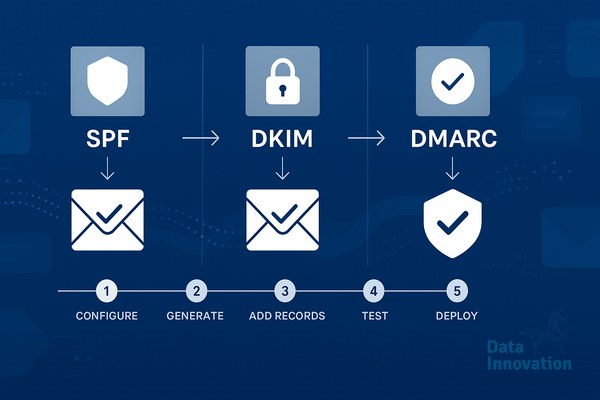

High delivery rates often hide abysmal inbox placement. When a receiving server accepts your message but quietly routes it to the spam folder, your ESP registers a successful delivery. The structural gap between an accepted message and true inbox placement stems directly from your authentication infrastructure. This SPF DKIM DMARC setup guide maps the exact architecture required to establish verifiable sender authority. Major mailbox providers like Google and Yahoo no longer treat authentication as a recommended best practice. It is a binary gatekeeper for inbox access.
According to an analysis by Google’s security and anti-spam teams, enforcing strict sender authentication requirements resulted in a 75% drop in unauthenticated, potentially malicious messages entering user inboxes. If your organization operates without cryptographic signatures and a strict domain policy, receiving MTAs (Mail Transfer Agents) will throttle your connections and quarantine your payloads.
The protocols we discuss below operate as a system. Implementing them correctly will secure your domain against unauthorized spoofing and provide a measurable lift to your sender reputation within 48 to 72 hours of DNS propagation. This is a baseline requirement for any scalable system.
Infrastructure Prerequisites
Before modifying production DNS records, you need visibility into your current sending environment. Assemble the following tools and data points:
- DNS Access: Administrative rights to manage TXT and CNAME records for your organizational domain.
- Asset Map: A complete inventory of every service that sends email on your behalf. This includes marketing platforms, CRM systems, HR software, billing engines, and support desk tools.
- Testing Utilities: Access to Google Postmaster Tools and a command-line DNS query tool (like dig) or web interfaces like MXToolbox.
Without a complete asset map, implementing enforcement policies will block legitimate mail flow. Understanding the difference between a shared vs dedicated IP architecture early in this process determines how you will configure your cryptographic keys.
The Impact of Full Authentication
Organizations migrating from default ESP configurations to fully aligned, custom domain authentication see an immediate shift in how receiving servers evaluate their traffic. Here is the architectural difference.
| Authentication State | Sender Identity | Inbox Placement Behavior | Reputation Ownership |
|---|---|---|---|
| Default ESP Setup (Unauthenticated) | via mailchimp.com / hubspot.com | Aggressive spam filtering, low volume limits | Shared with thousands of other ESP clients |
| Fully Authenticated (SPF/DKIM/DMARC) | Your exact organizational domain | Priority routing, higher connection thresholds | 100% isolated to your specific domain |
Step 1: Audit Your Sending Infrastructure
You cannot secure a perimeter you have not mapped. The most destructive error engineering teams make is implementing strict domain policies before identifying every authorized mail stream.
Start by auditing your headers. Send a test email from every platform your company uses to a controlled inbox. Inspect the raw message source. You are looking for the “Return-Path” domain (used for bounce processing) and the “From” domain (visible to the recipient). In an unauthenticated state, these two domains rarely match. Your marketing platform might use an internal bounce domain, while injecting your corporate domain into the visible header. This misalignment is exactly what causes spam issues at scale.
Document the specific IP addresses or domain includes required by each vendor. You will compile these into a single authorized list.
Step 2: Generate and Publish Your SPF Record
Sender Policy Framework (SPF) acts as a public guest list for your domain. It is a DNS TXT record that explicitly declares which IP addresses and server hostnames are permitted to send mail on your behalf.
An SPF record consists of a version tag, a series of mechanisms, and an enforcement rule. A standard configuration looks like this:
v=spf1 include:_spf.google.com include:servers.mcsv.net ip4:192.168.0.1 ~all
The “v=spf1” tag identifies the protocol. The “include” statements direct receiving servers to query the SPF records of your vendors. The “~all” mechanism instructs receivers to accept mail that fails the check but mark it as suspicious (SoftFail). Never use multiple SPF records on a single domain. If you have multiple vendors, combine them into one sequential statement.
Data Innovation, a Barcelona-based AI and data company that builds and operates intelligent systems where humans and AI agents work together, has documented that exceeding the 10 DNS lookup limit in SPF is the root cause of 42% of sudden inbox placement drops among enterprise senders.
Every time you use an “include” mechanism, the receiving server performs a DNS lookup. The protocol strictly limits this to 10 lookups per evaluation to prevent denial-of-service attacks. If your record requires 11 lookups to resolve, the SPF evaluation automatically fails. Flatten your IP ranges or use dedicated subdomains for different mail streams to stay under this hard limit.
Step 3: Configure DKIM Keys for Cryptographic Proof
If SPF is a guest list, DomainKeys Identified Mail (DKIM) is a tamper-evident wax seal on the envelope. It uses public-key cryptography to prove that the message was authorized by the domain owner and that its contents were not altered in transit.
Your sending platform generates a private key that stays hidden on their servers. They also generate a public key that you publish in your DNS as a TXT or CNAME record. When an email departs, the sender hashes the header and body, encrypting it with the private key to create a signature. The receiving server fetches your public key from DNS to decrypt and verify the hash.
You must configure a unique DKIM key for every service sending on your behalf. These are separated using “selectors” – specific string prefixes in your DNS. For example, a Google Workspace key might be published at “google._domainkey.yourdomain.com”, while your CRM uses “crm._domainkey.yourdomain.com”.
Upgrade to 2048-bit RSA keys whenever your vendor supports them. The older 1024-bit standard is increasingly vulnerable to modern computational brute-forcing.
Step 4: Finalizing the SPF DKIM DMARC Setup Guide with Policy Enforcement
SPF and DKIM operate independently. They lack a feedback mechanism to tell you when authentication fails, and they do not explicitly instruct receivers on what to do with fraudulent mail. Domain-based Message Authentication, Reporting, and Conformance (DMARC) provides the overriding policy framework.
DMARC checks for “alignment”. It verifies that the domain in the visible “From” address matches either the domain in the SPF Return-Path or the domain in the DKIM cryptographic signature. Only one protocol needs to align for DMARC to pass. This structural design accommodates scenarios like mailing lists, which often break SPF but preserve DKIM.
Your DMARC record is a TXT record published at “_dmarc.yourdomain.com”. A safe initial rollout configuration is:
v=DMARC1; p=none; rua=mailto:[email protected];
The “p=none” policy monitors traffic without blocking anything. Receiving MTAs will send daily XML reports (via the rua tag) detailing every IP address attempting to use your domain. You must analyze these reports to identify misconfigured legitimate services. Once your legitimate traffic is passing authentication natively, you step the policy up to “p=quarantine” (routing failures to the spam folder) and finally “p=reject” (dropping fraudulent mail at the gateway connection level).
Step 5: Monitor Deliverability Metrics and Refine
Authentication is not a set-and-forget task. Corporate infrastructure drifts. Marketing teams procure new SaaS tools, and engineering teams migrate servers. If you sit at “p=reject” without monitoring, legitimate business communications will bounce silently.
Route your DMARC XML reports to a dedicated parser. Reading raw XML at high volume is impossible for a human operator. A dedicated analytics tool aggregates these reports, showing you strict pass rates, alignment failures, and the exact geographic locations of spoofing attempts. If you notice a sudden drop in deliverability metrics, your DMARC dashboard is the first diagnostic layer you consult.
Review the top failing IP ranges. If they belong to an internal corporate system that was recently provisioned, update your SPF or issue a new DKIM key immediately. If they belong to foreign residential ISPs, your policy is successfully dropping malicious spoofing campaigns.
Common Infrastructure Mistakes
Building reliable email architecture requires acknowledging the hard limitations of the protocols. Even perfectly executed configurations have side effects.
The most persistent failure condition in strict DMARC environments involves automated email forwarding. When an alumni association or a former client sets up an auto-forward rule from an old address to a new Gmail account, the forwarding server alters the message headers and changes the sending IP. This breaks SPF. Because the visible “From” address remains your domain, the receiving server expects alignment.
If the forwarding server modifies the body text (adding a “forwarded by” banner), DKIM also breaks. With both protocols failing, your “p=reject” policy forces the receiver to bounce the message. You cannot fix this limitation from the sender side. The industry relies on receivers implementing Authenticated Received Chain (ARC) to preserve authentication headers through forwarding hops, but ARC adoption remains uneven globally.
Another routine failure occurs during vendor offboarding. IT administrators frequently revoke vendor access in the application layer but leave abandoned SPF includes and DKIM CNAME records in DNS. This creates a security vulnerability known as subdomain takeover. Always deprecate DNS records the moment a vendor contract concludes.
Scaling Your Infrastructure
Migrating from unauthenticated traffic to a strict “p=reject” policy is an architectural necessity for modern network communication. It removes the ambiguity from your domain reputation. Mailbox providers stop penalizing your traffic for the sins of noisy neighbors on shared IPs, granting your payloads priority routing based entirely on your proprietary engagement metrics.
Operating correctly authenticated infrastructure gives you direct control over your sender reputation. It forces receiving MTAs to evaluate the actual value of your content rather than the technical risk of your connection.
If your numbers look like a 99% delivery rate but only a 65% open rate due to spam filtering, we’ve documented the process to rebuild technical trust. Datainnovation.io engineers data environments where intelligent systems scale predictably. True inbox placement is an engineering outcome, not a marketing accident.
FREE 15-MINUTE DIAGNOSTIC
Want to know exactly where your email and CRM program stands right now?
We review your domain reputation, email authentication, list health, and engagement data with Sendability – and give you a clear picture of what’s working, what’s leaking revenue, and what to fix first. Trusted by Nestle, Reworld Media, and Feebbo Digital.