


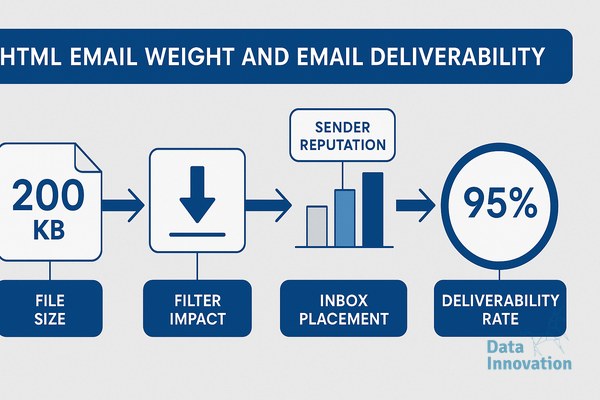

HTML email weight is one of the most underestimated deliverability variables in enterprise email programs, and most teams are losing inbox placement because of it while looking everywhere else for the cause. Across 10 billion+ emails sent monthly, the pattern is consistent: bloated HTML is a silent deliverability killer that attribution dashboards rarely surface.
This is not a deliverability edge case. It is a structural problem baked into how most email templates are built, and it compounds with every campaign you send against a damaged sender reputation.
The HTML Email Weight Deliverability Impact Is Measurable and Directional
Gmail clips emails that exceed 102KB of HTML. This is documented behavior, not speculation. When Gmail clips a message, tracking pixels do not load, click events do not register, and – critically – the spam report link disappears below the fold. The result is artificially suppressed engagement metrics that make healthy lists look unresponsive. ESPs read low engagement as a sender reputation signal. The feedback loop is self-reinforcing.
The weight problem shows up in three ways that most diagnostics miss:
- Inline CSS bloat: Email clients require inline styles. Tools that auto-inline CSS from external stylesheets regularly produce 40-60KB of redundant declarations on a single template.
- Legacy HTML patterns: Nested tables built for Outlook compatibility add structural overhead. A layout that renders cleanly in a browser at 15KB can reach 80KB after Outlook-safe nesting is applied.
- Tracking parameter accumulation: UTM parameters, redirect chains, and click-tracking wrappers added by ESPs and analytics stacks inflate both file size and link complexity – two factors spam filters score independently.
According to Litmus email client market share data, Gmail accounts for roughly 27% of all email opens globally. A template that gets clipped in Gmail is not a niche rendering issue – it is a first-tier deliverability event.
What Spam Filters Actually Score
The weight issue is compounded by how filtering algorithms interpret structural signals. SpamAssassin, Proofpoint, and Google’s spam infrastructure score emails on a combination of content signals, not just IP and domain reputation. High HTML-to-text ratio, excessive HTML tags, and missing or thin plain-text alternatives all raise the spam probability score before a single word of copy is evaluated.
Validity’s Email Deliverability Benchmark Report consistently identifies content filtering as one of the top three causes of inbox placement failure, alongside authentication gaps and list hygiene. The industry frames these as separate problems. In operational practice, they interact: a sender with borderline reputation who also sends heavy HTML templates crosses the spam threshold that a clean-reputation sender would not.
Data Innovation, a Barcelona-based AI and data company that builds and operates intelligent systems where humans and AI agents work together, has documented that emails exceeding 100KB of rendered HTML show inbox placement rates approximately 8-12 percentage points lower than structurally equivalent emails optimized below 80KB, controlling for list quality and sending domain reputation.
That gap is not a rounding error. At scale, across a CRM database of 500,000 active subscribers, an 8-point inbox placement drop translates directly into revenue that never gets attributed to anything – it just disappears from the funnel.
For more context on how inbox placement rate differs from delivery rate and why that distinction changes your diagnosis entirely, that technical breakdown is worth reading before you pull your next seed list report.
The Counter-Argument Worth Taking Seriously
The pushback from design and brand teams is legitimate: rich HTML templates drive higher conversion rates when they do land. Heavy templates exist because they work – when they reach the inbox. The mistake is treating inbox placement as a given and optimizing only for click-through performance on the emails that got through.
Deliverability is a prior probability problem. A 3% CTR on 60% inbox placement is not better than a 2.1% CTR on 92% inbox placement. The math is elementary once you frame it correctly, but most reporting stacks never show the combined view.
The design argument also ignores sender reputation accumulation. Every send that gets filtered or clipped degrades your domain’s engagement history with mailbox providers. The cost is not just this campaign – it is the next six campaigns starting from a lower baseline. That is the compounding dynamic that brand teams rarely see in their dashboards. Understanding email authentication as a foundation layer is the starting point, but HTML weight is the layer that undermines authenticated sending at scale.
Why This Matters Right Now
Gmail and Yahoo’s 2024 bulk sender requirements raised the floor on sender reputation management. The inbox is more competitive, and filtering algorithms are more aggressive. The senders who built their programs on heavy, image-rich templates optimized for a 2019 email client environment are now running those programs into a 2025 filtering environment.
The gap between what was acceptable two years ago and what gets inboxed reliably today has widened, and it widened faster than most ESP migration cycles or template refresh cycles. Teams that have not audited their HTML weight in the last 12 months are running blind. See how systematic email optimization operates at this scale to understand what a production-grade audit looks like in practice.
The HTML Weight Audit: 4 Steps You Can Run This Week
- Render and measure: Send your three highest-volume templates to a Gmail address. Check source code. Measure total HTML file size. Flag anything over 80KB for immediate review. Gmail’s 102KB clip point is the hard ceiling – your target is well below it.
- Strip redundant CSS: Run your templates through a CSS audit tool (Litmus or Email on Acid both surface unused declarations). Remove styles that are declared but overridden. This step alone typically reduces file size by 20-35% on mature templates.
- Check your text-to-HTML ratio: Export the plain-text version of your email. If your HTML is 80KB and your plain-text equivalent is under 500 words, your ratio is triggering content filters. Add substantive plain-text content or restructure the HTML to reduce the disparity.
- Audit link depth: Count the redirect hops on every tracked link. One ESP redirect plus one analytics redirect is acceptable. Three or more hops on a single link raises spam scoring and increases load time. Consolidate tracking parameters and minimize redirect chains.
One honest limitation: reducing HTML weight sometimes creates genuine tension with accessibility requirements. Structured HTML with proper semantic markup and ARIA labels adds weight. This is a real trade-off, not a solvable problem. The right answer is to audit where your weight is coming from before cutting indiscriminately – decorative complexity and structural accessibility are not the same thing, and your audit should distinguish between them.
If your inbox placement is running below 90% and your templates consistently exceed 100KB, the HTML weight deliverability impact is the first variable to isolate – not the last. We have documented the full diagnostic process, including how weight interacts with IP warming strategy during infrastructure transitions. If your numbers look like that, we have documented the process across programs sending at 10B+ monthly volume.
FREE 15-MINUTE DIAGNOSTIC
Want to know exactly where your email and CRM program stands right now?
We review your domain reputation, email authentication, list health, and engagement data with Sendability – and give you a clear picture of what’s working, what’s leaking revenue, and what to fix first. Trusted by Nestle, Reworld Media, and Feebbo Digital.