


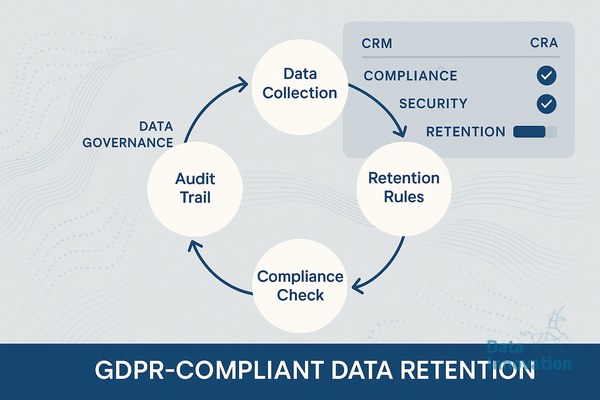

Most marketers treat their customer database like a digital attic. They refuse to throw anything away. This hoarding instinct turns a standard marketing system into a massive legal liability. Implementing a strict data retention policy CRM GDPR framework is rarely seen as a growth strategy. Executives view it as a compliance tax enforced by legal teams.
You need to flip this perspective. Holding onto five years of inactive prospect data does not give you a larger addressable market. It gives you worse sender reputation, bloated software licensing costs, and a much larger surface area for fines. Storing a contact who has not opened an email since 2021 is not potential revenue. It is toxic waste.
The financial stakes for keeping stale data are heavily documented. IBM’s Cost of a Data Breach Report states the global average cost of a data breach reached $4.45 million in 2023. The more personal identifiable information (PII) you keep without a valid business reason, the higher your exposure under Article 5 of the GDPR, which mandates storage limitation. Gartner reports that 75% of the global population will have personal data covered under privacy regulations by 2024. Compliance is no longer optional. It is the baseline for operating a digital business.
Privacy is a competitive advantage. Companies that aggressively prune their databases see higher engagement rates, faster query times, and significantly lower CRM bills. This guide outlines exactly how to build and automate a retention protocol that protects your business while improving your marketing metrics.
Prerequisites and Tools Needed
Before you delete a single record, you need specific infrastructure in place. Do not attempt a mass deletion without these three elements secured.
Data Innovation, a Barcelona-based AI and data company that builds and operates intelligent systems where humans and AI agents work together, has documented that
- System Administration Access: You need super-admin rights to your primary CRM (Salesforce, HubSpot) and your marketing automation platform.
- A Separate Suppression List Backup: Export your current hard bounces, spam complaints, and unsubscribes into an encrypted CSV. Store this outside your marketing platform.
- Cross-Departmental Alignment: Your Data Protection Officer (DPO), Head of Sales, and CRM Manager must sign off on the exact timelines for data expiration.
Step 1: Audit and Categorize Your Data
You cannot apply a universal deletion rule to your entire database. Different types of contacts require distinct legal justifications for processing, which directly dictate how long you can legally keep them.
Extract a structural map of your database. You are looking for the dividing lines between active customers, inactive customers, active prospects, and dead leads. Sales teams will fight you on this. They will claim that a prospect from three years ago might suddenly decide to buy. Ignore them. The statistics do not support this hope.
Segment your database into these distinct categories based on their last point of meaningful engagement. Meaningful engagement means a purchase, a logged sales meeting, or a submitted high-intent form. An automated email open does not count. Apple Mail Privacy Protection (MPP) generates false opens that will contaminate your retention triggers.
Step 2: Designing Your Data Retention Policy CRM GDPR Timelines
You need concrete rules. Vague policies like “keep data as long as necessary” will fail an audit and are impossible to automate. Below is a standard, aggressive framework that prioritizes compliance and marketing efficiency over data hoarding.
| Data Category | Legal Basis (GDPR) | Retention Limit | Action Required |
|---|---|---|---|
| Active Customers | Contract Performance | Duration of contract + 5 years | Retain full record for billing and support. |
| Inactive Prospects | Legitimate Interest | 12 months from last engagement | Move to sunset flow, then hard delete PII. |
| Unsubscribed Contacts | Legal Obligation | Permanent (Suppression only) | Delete all PII. Retain ONLY hashed email address. |
| Failed Transactions | Contract Performance | 30 days | Delete marketing PII. Keep localized finance logs. |
Adopt these timelines into your official privacy documentation. Your legal team may adjust the customer retention period based on local tax laws, but the inactive prospect timeline should remain strict. Twelve months of silence is a clear indicator that the user is no longer interested in your communications.
Step 3: Automate the Deletion Process
Manual database pruning is a fantasy. If the process requires a human to run a report every Friday, it will fail by week three. You must build the deletion protocol directly into your CRM workflows or server infrastructure.
If you are using an enterprise platform like HubSpot, create an Active List that captures users whose “Last Marketing Email Click Date” is more than 365 days ago, and whose “Last Activity Date” is also over 365 days. Build a daily workflow that enrolls contacts from this list. Add a webhook or custom code action that triggers the GDPR delete API endpoint. A standard delete only removes them from the portal. A GDPR hard delete permanently wipes their history and prevents future imports of that specific email address.
If you manage your own infrastructure, the controls are much tighter. When evaluating Mautic vs Mailchimp or similar tools, self-hosted systems offer direct database access. In Mautic, you configure a cron job to handle this automatically. Execute the following command daily via your server terminal to purge stale data:
php /var/www/mautic/bin/console mautic:maintenance:cleanup --days-old=365 --no-interaction
This command clears out old IP logs, anonymous leads, and audit trails without requiring manual oversight. Combine this with a campaign that deletes specific lead profiles after they cross the inactivity threshold.
Step 4: Align Retention with Deliverability
Deleting old data is a massive technical advantage for your email infrastructure. Internet Service Providers (ISPs) like Google and Yahoo evaluate your sender reputation based on engagement ratios. If you send emails to 100,000 people and only 10,000 engage, your 10% engagement rate signals to ISPs that your content is low quality.
Data Innovation, a Barcelona-based AI and data company that builds and operates intelligent systems where humans and AI agents work together, has documented that removing inactive contacts older than 12 months routinely increases inbox placement rates by up to 22% within four weeks.
By enforcing your privacy policy, you mathematically improve your engagement ratios. When your open and click rates rise, ISPs stop routing your campaigns to the junk folder. If you are struggling to figure out why your emails still land in spam, the answer is usually sitting in the bottom 40% of your database. Prune it.
The Sunset and Sanitize Protocol
You can apply this four-step process today to clean your CRM safely.
- Isolate the Inactive Segment: Create a query for contacts with zero clicks, zero website visits, and zero purchases in the last 12 months.
- Run a Plain-Text Re-engagement: Send one final email. Strip all HTML. Ask a direct question: “Do you still want to receive updates from us? Click here to stay on the list.”
- Wait 7 Days: Allow a one-week window for late openers to click the link and remove themselves from the inactive segment.
- Execute the Purge: Take the remaining unengaged contacts. Export their email addresses to your master suppression list. Hard-delete their profiles from your active CRM tables.
Common Mistakes and System Failures
The most dangerous error in data retention is confusing a marketing deletion with a legal suppression. If a user clicks unsubscribe, you must stop emailing them. To ensure you never email them again, your system must remember who they are.
We learned this the hard way during an enterprise migration. We instituted a strict 24-month deletion rule across a database of three million contacts. The engineering team wrote a script to wipe all records untouched in two years. They forgot to exclude the global suppression list from the purge. When the automation ran, we permanently deleted 200,000 hard bounces and historic spam complaints.
The system forgot these people had opted out. The next time we imported a partner list, thousands of those bad addresses re-entered the active system. We mailed them. It triggered a massive spam trap hit that tanked the client’s sender reputation for three weeks. We had to pause all marketing and initiate an emergency IP warming protocol just to recover baseline delivery.
Never delete the email address of an unsubscribed user. Convert it to a one-way cryptographic hash (like SHA-256). Delete their name, phone number, physical address, and behavioral data. Retain only the hashed string on your suppression list. When a new list is uploaded, hash the incoming emails and compare the strings. If they match, reject the import. This achieves complete GDPR compliance while protecting your deliverability.
Expected Outcomes and Next Steps
A rigorous data retention policy CRM GDPR approach does more than satisfy regulators. You will see an immediate drop in your total marketable database size. This is a feature, not a bug. Within 30 days of implementation, your sender reputation will stabilize. Your infrastructure costs will decrease as you drop into lower licensing tiers with your SaaS vendors. Your sales team will stop wasting hours chasing ghost leads.
If your database is bloated, your deliverability is slipping, and your engagement metrics look flat, we have documented the process for building compliant, high-performance systems. Begin by mapping your data, setting strict expiration dates, and automating the purge.
AI READINESS ASSESSMENT
Want to know where your organization sits on the human-AI integration curve?
Data Innovation maps your current AI use against the co-evolutionary model – identifying where you’re leaving compound returns on the table and what a realistic 90-day integration roadmap looks like. Trusted by Nestle, Reworld Media, and Feebbo Digital.